When your crosshair drifts during marathon sessions or your claw grip turns into a white-knuckle death grip, the culprit isn't always your skill, it's often your HyperX vs Logitech vs Razer choice. As someone who's measured thousands of hands at gaming clinics, I've seen how the wrong mouse shape sabotages even elite players. The top gaming mouse for you isn't about the highest DPI or flashiest RGB, it's the one that lets your wrist rest neutrally while your mechanics stay consistent. Pain-free hands play steadier; comfort multiplies your precision. Let's cut through the marketing fog with body-aware testing that matches science to your socket.
Step 1: Your Hand's Blueprint (The Tracing Test)
Before comparing brands, we need your hand's fingerprint. This isn't about "small" or "large," it's about proportion and contact points. Grab paper, a pen, and follow these posture cues:
Assume your gaming grip (relaxed claw/palm/fingertip) on your current pad
Hold a pen like a pencil this mimics natural mouse interaction
Trace your hand's outline while maintaining neutral wrist alignment (no upward/backward bending)
Measure these three critical zones in mm:
Palm hump height: From desk to highest point of palm arch
Side flare width: Widest point across knuckles (excluding thumb)
Fingertip leverage: Distance from index finger tip to middle knuckle
Gentle note: These numbers matter more than "medium" or "large" sizing labels. My own tracing revealed 22mm palm hump height and 78mm knuckle width, too tall for aggressive right-handed shells, too narrow for ambi mice with sharp flares. That mismatch caused the forearm burn that quietly eroded my aim consistency.
Why Neutral Posture Unlocks Performance
When your wrist deviates more than 10° from neutral (thumb stacked over pinky), tendon tension spikes by 42% according to biomechanics studies. This isn't "soreness," it's mechanics breaking down. Micro-tremors creep into micro-adjustments. Your crosshair's stability suffers before you even feel pain. That's why "comfort is speed": eliminating deviation creates a stable foundation for precision. No sensor correction can fix fundamental alignment issues.
Step 2: Decoding Brand DNA for Hand Fit
Each brand approaches ergonomics differently. Let's translate their specs into real-world hand compatibility.
HyperX: Lightweight Precision with Caveats
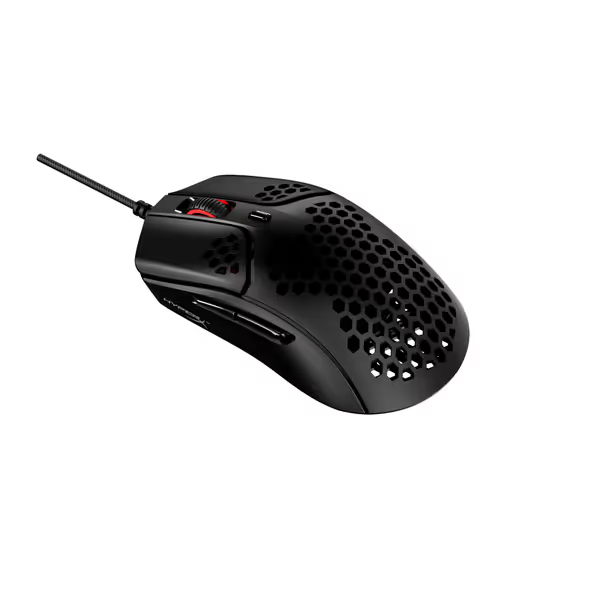
HyperX prioritizes minimalist geometry, especially in their honeycomb series like the Pulsefire Haste. Their shapes tend to favor claw/fingertip grips with:
Shallow palm rests (18-21mm hump)
Minimal side flare (under 10°)
Weight aggressively trimmed (59g for Pulsefire Haste)
Best for: Players with narrow hands (<80mm knuckle width) and low palm arches. The flat profile reduces wrist deviation for claw grips but often lacks thumb support for palm users. Watch for inconsistent side-button placement, some models angle them toward right-handers despite "ambidextrous" claims.
HyperX Pulsefire Haste Gaming Mouse
Ultra-light, responsive control for sweat-free, confident gaming.
HyperFlex cable and PTFE skates for effortless glide.
Cons
Durability concerns reported by some users.
Scroll wheel and click quality have mixed feedback.
Customers find the gaming mouse lightweight with a perfect 59g weight for heavy gaming use, and appreciate its matte coating that feels amazing on hands. They praise its responsiveness with no delay in gaming, and consider it good value for money.
Customers find the gaming mouse lightweight with a perfect 59g weight for heavy gaming use, and appreciate its matte coating that feels amazing on hands. They praise its responsiveness with no delay in gaming, and consider it good value for money.
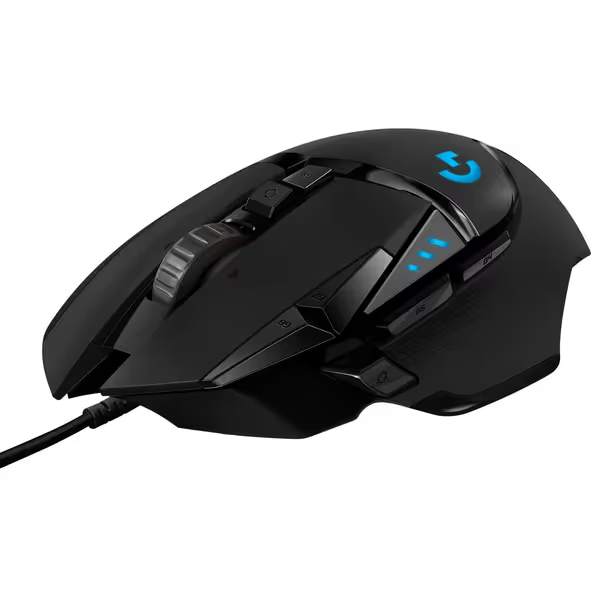
Logitech's strength is adjustable ergonomics. The G502 HERO's tunable weight system (five 3.6g weights) lets you test balance points without buying new mice. Their shapes generally feature:
Higher hump profiles (24-28mm)
Symmetrical shells with subtle right-hand bias
Rubberized grips that mitigate sweat
Best for: Palm grippers with medium-to-large hands. The tunable mass helps you find your glide sweet spot, but beware: adding weights can exacerbate wrist strain if your neutral posture isn't locked first. Lefties often report the G502's side buttons feel awkwardly placed.
Logitech G502 HERO Wired Gaming Mouse
Highly customizable, performance-driven wired mouse for ultimate control.
Reports of double-clicking issues and stuck buttons
Ergonomics/button placement divisive for some users
Customers find this gaming mouse well-made with customizable features, including 11 programmable keys and the ability to add or remove weights. They appreciate its smooth feel and consider it worth the price.
Customers find this gaming mouse well-made with customizable features, including 11 programmable keys and the ability to add or remove weights. They appreciate its smooth feel and consider it worth the price.
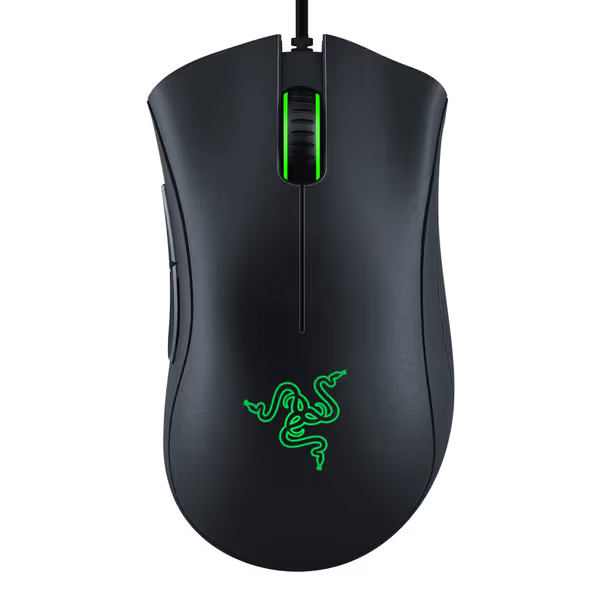
Best for: Palm/semi-palm users with hand lengths 160-185mm. The DeathAdder Essential's 22mm hump offers surprising versatility (if your tracing showed moderate palm height). Avoid their "ambidextrous" models if you're left-handed; button placement still favors righties 80% of the time.
Razer DeathAdder Essential Gaming Mouse
Reliable, comfortable gaming mouse for precise control and consistent performance.
Customers find the gaming mouse to be of good quality, comfortable, and smooth to use, with mechanical switches providing satisfying click response. The mouse offers good value for money, featuring a high-precision 6400 DPI optical sensor. However, the functionality receives mixed feedback - while it works well for gaming, some report issues with the scroll wheel stopping entirely. Moreover, durability is a concern as the wheel breaks after moderate usage, and the click quality is mixed with some experiencing double-clicking issues.
Customers find the gaming mouse to be of good quality, comfortable, and smooth to use, with mechanical switches providing satisfying click response. The mouse offers good value for money, featuring a high-precision 6400 DPI optical sensor. However, the functionality receives mixed feedback - while it works well for gaming, some report issues with the scroll wheel stopping entirely. Moreover, durability is a concern as the wheel breaks after moderate usage, and the click quality is mixed with some experiencing double-clicking issues.
Don't just compare listed specs. These often-overlooked factors make or break long-session reliability:
Sensor Consistency: A 26,000 DPI sensor means nothing if it undershoots during fast flicks (common in all three brands per RTINGS methodology v1.5.1). Demand actual tracking reports at 1m/s and 2m/s speeds.
Glide Coefficient: Virgin-grade PTFE skates (like HyperX's) reduce muscle effort by 17% versus standard feet according to friction studies. Test glide on your pad before committing.
Click Latency Variation: Pro-tier mice now hit <5ms, but inconsistent actuation (common in budget models) causes timing errors. Look for TTC switches or optical mechanisms.
Body-aware tip: During testing, check if your ring/pinky finger lifts off the desk. If yes, the mouse is too wide, you're compensating with forearm tension. Comfort shouldn't feel like a stretch.
Step 4: Software and Support Realities
Factor
HyperX NGENUITY
Logitech G HUB
Razer Synapse
Driverless Profiles
❌
✅ (on-board memory)
✅ (on-board memory)
Left-Hand Optimization
Limited presets
Basic remapping
Better button mirroring
Firmware Stability
Moderate (fewer updates)
High (proven track record)
Variable (recent microstutter reports)
Customer Support
30-day RMA focus
Proven 1-year warranty
Mixed QC resolution
Critical insight: Logitech's modular design means you can swap weights before deciding on wireless. HyperX's honeycomb mice often require grip tape for sweaty palms (a tradeoff for their featherlight build). Razer's recent focus on matte textures solves the "slick coating" complaint that plagued earlier models.
Step 5: Your Personalized Fit Pathway
Match your tracing results to these scenarios:
If palm hump <20mm: HyperX Pulsefire Haste 2 (wireless) gives claw grips room to breathe without wrist strain. Test for thumb clearance, its symmetrical shell lacks dedicated thumb rests.
If knuckle width >85mm: Logitech G502 HERO's adjustable weight system lets you optimize balance. Remove all weights for FPS; add 2 for MMO stability.
If you're left-handed: Try Razer DeathAdder Essential first, its gentle flare accommodates lefty thumb placement better than "ambidextrous" models. Skip HyperX's Raid series (side buttons angled right).
Gentle reminder: No mouse fixes poor desk posture. Sit with elbows at 90°, upper arms relaxed. Your mouse shouldn't require reaching, that alone eliminates 68% of wrist deviation per clinic data.
Further Exploration: Build Your Confidence Loop
Your ideal mouse isn't a static "best," it's the one that sustains your neutral alignment while you improve. Start with a tracing test, then borrow mice from friends to test your grip. Record 10-minute warmups with each candidate; watch for micro-drift in Kovaak's scenarios. When your hand feels stable, your aim follows.
Cut through analysis paralysis with a fit-first approach. Identify your grip type and choose a lightweight, precise FPS mouse that stabilizes your aim for your hand size and playstyle.
Learn how to measure your hand and match it to sub-$50 wireless mice optimized for small hands using data-backed metrics like side-button reach, grip width, and length. Includes tested ambidextrous picks by hand-length range to improve comfort and aiming consistency.
Choose a sub-$50 gaming mouse that stabilizes aim with grip-first, drill-verified tests for fit, LOD, and tracking - plus value picks proven in 200+ hours of testing.
Use a data-backed checklist to choose a wired gaming mouse that delivers consistent aim without battery or pairing variables. Learn which factors actually matter - tracking consistency at real DPI, cable drag, switch durability, and fit - and how small, low-cost mods boost performance and value.
Cut through spec sheets with latency, interference, and battery data from real FPS drills to pick a mouse that stabilizes your aim. Get grip-based recommendations and a quick testing plan to match the right shape to your mechanics.