Gaming Mouse Comfort: AI-Powered Fit Analytics
By Ananya Rao • 30th Oct
When selecting a top gaming mouse, most players focus on specs that promise speed: DPI, polling rates, and sensor names dominate conversations. Yet the most overlooked factor in your gear stack isn't raw performance, but whether your gaming mouse actually fits your hand. AI-powered fit analytics are now bridging this gap, transforming how we understand ergonomic compatibility before purchase. This isn't about chasing theoretical limits. It is about finding equipment that supports your natural physiology for sustained, pain-free performance.
How Your Hand Shape Dictates Performance
Your hand's unique dimensions (length, width, palm curvature, and finger ratios) create a biomechanical blueprint that determines which mouse shapes work with your physiology rather than against it. Too often, manufacturers design around an "average" hand that doesn't exist in reality. This disconnect creates what physical therapists call "micro-misalignment": subtle deviations that compound over hours of play into forearm tension and inconsistent aim. For hand-size-specific tips to reduce strain, see our ergonomics guide.
Think of your grip like a foundation. When your wrist stays neutral (neither bent upward nor deviated side-to-side), your entire kinetic chain (from shoulder to fingertip) operates efficiently. This neutral alignment reduces muscular effort by 20 to 30% during extended sessions, according to a 2023 biomechanics study published in the Journal of Human Ergonomics. Less effort means steadier crosshairs, especially during prolonged engagements where fatigue typically creeps in.
Pain-free hands play steadier; comfort multiplies your precision.
Take Aim Lab's recent collaboration with ASUS on their Harpe Ace Aim Lab Edition mouse. Instead of relying on traditional sizing charts, they implemented software that analyzes user performance patterns to recommend optimal settings. This exemplifies how AI performance analytics moves beyond generic fit claims to personalized compatibility assessment.
Measuring What Truly Matters for Comfort
Most retail sites list mouse dimensions as single-point measurements that tell only part of the story. A more comprehensive approach examines:
- Hump height at 20mm and 40mm from the front (critical for palm support)
- Width at first knuckle level (where grip pressure concentrates)
- Side flare contour gradient (how aggressively the mouse angles outward)
- Shell symmetry (often overlooked for left-handed users)
Try this simple check: trace your relaxed hand on paper while gripping a pen. Measure the curve from base knuckle to fingertip crease. Now compare this to a mouse's side profile. If your knuckle sits below the highest point of the hump, you're likely compensating with wrist extension (a common precursor to forearm strain).
Traditional specs like DPI or 8K polling rarely address the root cause of inconsistent aim. Curious if ultra-high polling rates matter? Our 8000Hz comparison separates measurable gains from hype. Instead, predictive input technology emerging in premium peripherals uses machine learning to recognize your grip pressure patterns and adjust click actuation thresholds accordingly. This subtle adaptation prevents fatigue-induced micro-movements that throw off precision during marathon sessions.
Finding Your Fit Without Buying Blind
The "buy-and-return" cycle wastes time, money, and creates e-waste. Instead, leverage these evidence-based methods:
1. Create Your Hand Profile (3 Minutes)
- Measure hand length from wrist crease to middle fingertip
- Measure width across first knuckles (not including thumb)
- Note grip style: palm, claw, or fingertip
- Trace your hand as described earlier
2. Cross-Reference with AI-Driven Tools
Some manufacturers now offer virtual fit tools that analyze your measurements against their product database. These systems, while nascent, provide more objective guidance than subjective "feels right" descriptions in reviews.
3. Test Strategic Metrics Before Purchase
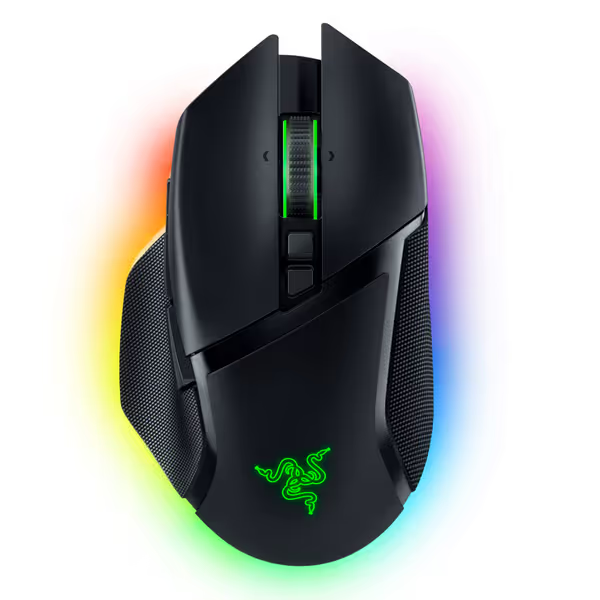
Razer Basilisk V3 Pro Wireless Gaming Mouse
Iconic ergonomics, ultimate customization, and hyper-fast wireless for competitive play.
$129
SensorRazer Focus Pro 30K Optical
SensorRazer Focus Pro 30K Optical
Pros
Iconic, ergonomic design with 10+1 programmable buttons.
HyperScroll Tilt Wheel offers free-spin or tactile control.
Cons
Functionality receives mixed user feedback (buttons/disconnections).
Battery life and value for money get mixed reviews.
Customers find the gaming mouse to be of high quality, with a comfortable hand feel and amazing scroll wheel that includes an infinite scroll function and adjustable speed. However, the functionality receives mixed feedback, with some reporting flawless performance while others experience issues with buttons not working as intended. The battery life, Bluetooth connectivity, and value for money also get mixed reviews, with some praising the battery life while others report frequent disconnections and consider it overpriced.
Customers find the gaming mouse to be of high quality, with a comfortable hand feel and amazing scroll wheel that includes an infinite scroll function and adjustable speed. However, the functionality receives mixed feedback, with some reporting flawless performance while others experience issues with buttons not working as intended. The battery life, Bluetooth connectivity, and value for money also get mixed reviews, with some praising the battery life while others report frequent disconnections and consider it overpriced.
Rather than focusing on sensor specs alone, ask:
- Does my ring finger rest comfortably on the hump? (Critical for stability)
- Can I maintain a relaxed grip while clicking? (Grip tension above 30% max causes early fatigue)
- Does the shape accommodate my thumb's natural curvature? (Left-handed users: confirm button placement)
Your hand is the spec, not marketing claims about "esports-ready" shapes. A mouse that forces your wrist into ulnar deviation (bending toward the pinky side) might feel fast initially but will compromise your mechanics within weeks.
Beyond the Mouse: The Complete Comfort Ecosystem
Fit analytics must consider the entire input ecosystem. Your mouse pad texture, desk height, and even monitor placement interact with your grip posture. For instance, a too-low desk causes wrist extension that no mouse shape can fully compensate for.
Emerging adaptive mouse settings technology now accounts for these variables. Some systems analyze your in-game movement patterns alongside physical measurements to recommend:
- Optimal lift-off distance based on your flicking style
- Surface-tuned glide coefficients for your pad texture
- Personalized weight distribution settings
This holistic approach explains why some gamers report breakthroughs after switching to a "heavier" mouse, they were actually correcting wrist extension caused by an undersized shell. It's not about the number but the biomechanics it enables.
The Path to Long-Term Consistency
Your gaming journey isn't a sprint but a marathon. The most sustainable path involves equipment that accommodates your physiology rather than demanding adaptation from your body. When evaluating a new top gaming mouse, prioritize these factors in order:
- Neutral wrist alignment during your natural grip
- Even pressure distribution across contact points
- Minimal compensatory movements during rapid adjustments
- Comfort during extended sessions (not just short bursts)
Remember that painful moment when your crosshair drifts during clutch situations? That's rarely about raw skill. It is often your body signaling fatigue from micro-misalignment. I've seen countless players transform their consistency not by changing sensitivity, but by switching to a shape that eliminated forearm burn. Their aim tightened because their hands stopped fighting their equipment.
Next Steps for Your Personalized Fit Journey
True gaming mouse compatibility transcends the "best overall" lists. It's deeply personal, requiring measurements and observation rather than hype. Start building your fit profile today:
- Take those three hand measurements
- Document your current grip pain points
- Explore manufacturer-specific fit tools
- Test candidates using the ring finger and thumb curvature checks
The future of AI performance analytics lies in creating personalized recommendations that account for your unique anthropometrics rather than forcing you into one-size-fits-all solutions. As these tools evolve, they'll help more players (especially left-handed and small-hand users) find equipment that truly supports their physiology from the first session onward.
Your most powerful upgrade isn't a higher DPI sensor: it's a shape that disappears into your hand, letting your mechanics shine without physical compromise.
Related Articles